My Works
Power Automate & Microsoft Lists — Compliance Tracking System
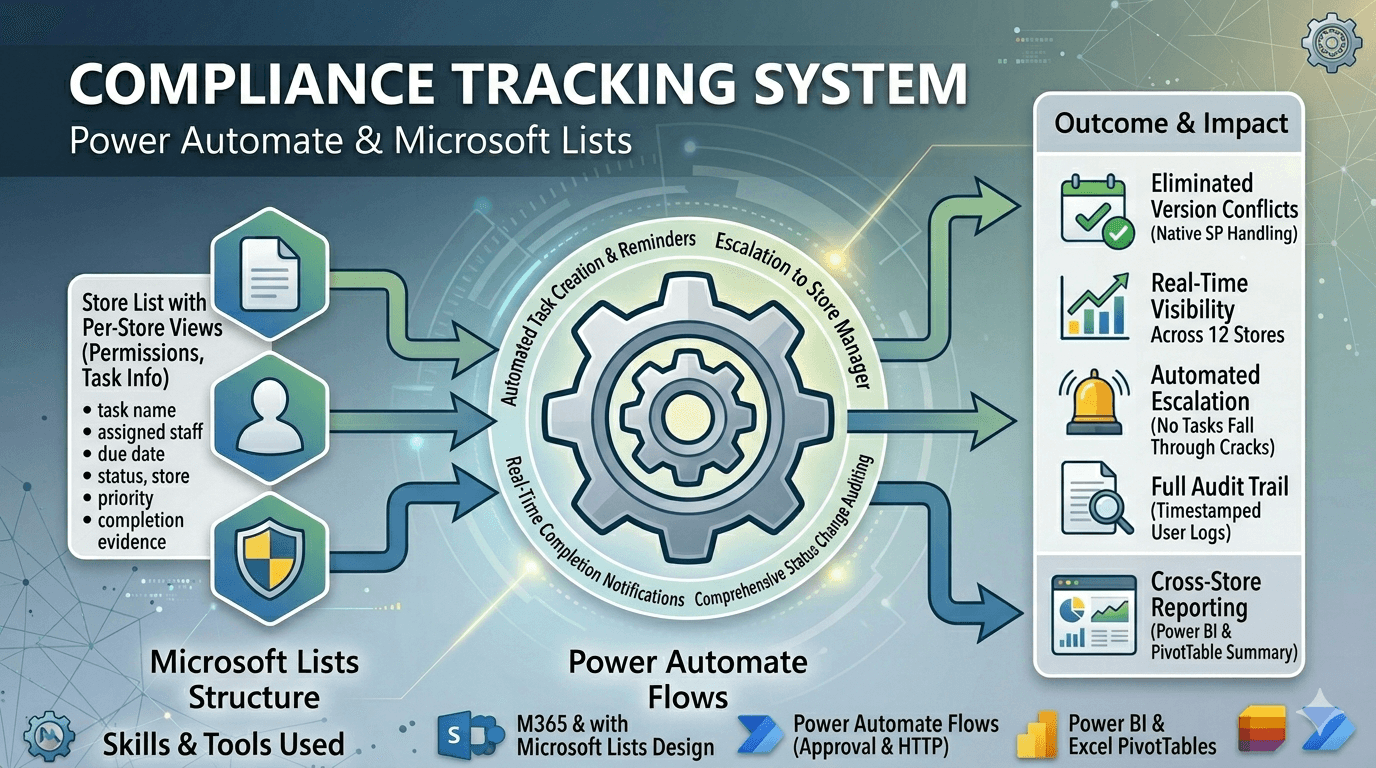
Overview
Replaced a fragile, version-conflict-prone Excel task system with a structured Power Automate + Microsoft Lists solution for compliance tracking across multiple stores. The migration delivered real-time, auditable compliance records, automated task assignment and escalation, and consolidated cross-store reporting — all without any third-party tools.
Problem Being Solved
The previous system used shared Excel files to track compliance tasks across 12 stores. Staff frequently overwrote each other's changes, version history was unreliable, and there was no visibility into overdue tasks or escalation paths. Management had to manually chase each store for status updates.
Solution Architecture
Microsoft Lists Structure
- A single list with separate views for each store created per store for local task ownership and clear permissions
- Columns defined for: task name, assigned staff, due date, status, store, priority, and completion evidence
- Choice and person columns enforce data consistency — no free-text status fields
- Views configured per role: staff see only their tasks; managers see all store tasks
- Version history enabled on all lists for a full audit trail of changes
Power Automate Flows
- Task Creation Flow: Automatically creates tasks in the correct store list when a new compliance requirement is logged
- Due Date Reminder: Sends email reminders to assigned staff 3 days and 1 day before due date
- Escalation Flow: If a task is not marked complete by the due date, automatically notifies the store manager
- Completion Notification: Triggers a confirmation email to the requester when a task is marked complete
- Status Change Audit: Logs every status change with timestamp and user to a separate audit list
Cross-store Reporting
- A scheduled Power Automate flow runs weekly, querying all store lists via SharePoint REST API
- Aggregated data is written to a central "Compliance Summary" SharePoint list
- Summary list feeds a Power BI report (or Excel PivotTable) accessible to management
- Report shows: overdue tasks by store, completion rates, upcoming deadlines, and escalation history
- Management gets a single consolidated view without contacting individual stores
Outcome & Impact
- Eliminated version conflict issues — concurrent edits are handled natively by SharePoint
- Real-time visibility into compliance status across all 12 stores
- Automated escalation means no tasks fall through the cracks silently
- Full audit trail for every task — who changed what, and when
- Management reporting time reduced from manual weekly collation to zero
- Staff adoption was high due to familiar Microsoft 365 interface
Skills & Tools Used
- Microsoft Lists — list design, permissions, views, and column types
- Power Automate — scheduled flows, approval actions, SharePoint connectors, HTTP requests
- SharePoint REST API — querying lists across store collections
- Microsoft 365 — permissions model, group management, and sharing configuration
- Process design — mapping existing manual workflows into automated equivalents
2025 Nishan. All rights reserved
